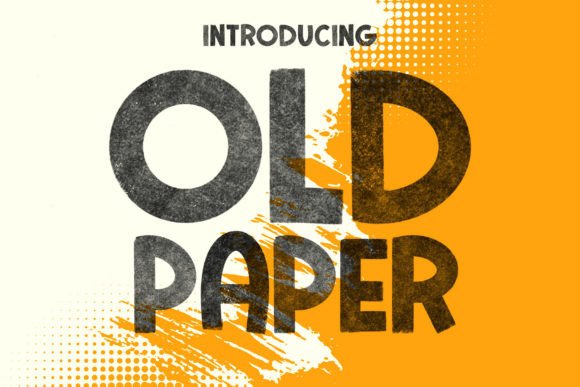
Old Paper: The Handwritten Bitmap Font for Authentic Design
There's a certain magic to a note scrawled on a piece of aged parchment, a feeling that digital text often struggles to capture. Old Paper is a font that bridges that gap, offering the intricate texture of a handwritten bitmap font directly within your design software. When enabled in applications like Photoshop, you don't just see letters; you see the nuanced details of brush strokes, the subtle imperfections that give writing its soul. This premium font isn't just a typeface—it's a design asset that injects immediate character and a human touch into any project it graces.
Why Texture Matters in a Digital World
In an era of clean, vector-based sans serif fonts, the tactile quality of a handwritten font like Old Paper provides a powerful counterpoint. Its visual appeal lies in its authenticity. Each character is rendered as a bitmap, meaning it's composed of pixels rather than mathematical curves. This preserves the organic feel of the original pen or brush on paper, complete with varying line weights and a slightly rough edge. This characteristic makes it a standout choice for projects where you want to evoke nostalgia, craftsmanship, or a personal connection. It’s a creative font that feels less designed and more discovered, adding a layer of storytelling to your typography.
From Brand Identity to Packaging Design
Consider how this typeface can shape a brand's personality. A small-batch coffee roaster could use Old Paper for its logo and packaging, instantly communicating artisanal quality and care. The font’s texture suggests a hands-on process, which aligns perfectly with products that value tradition and craft. For entrepreneurs and small business owners, this display font can become a cornerstone of visual consistency, used across business cards, website headers, and social media graphics to build immediate brand recognition. Its distinct style helps a brand stand out in a crowded marketplace, telling a story before a single word of copy is read.
The applications extend far beyond branding. Imagine wedding invitations that feel personally penned, or poster designs for a local theater production that have a vintage, authentic vibe. Bloggers and content creators can use it for featured images or quote graphics to add a layer of sophistication and interest, boosting audience engagement. In editorial design, it can be used for pull quotes or chapter headings in a book, adding a unique touch to the layout. The key is matching the font's personality—rustic, personal, and textured—to the project's goals.
A Practical Guide to Using and Customizing Old Paper
Integrating this typeface into your workflow is straightforward, but a few practical tips will help you get the most out of it. First, always consider readability. As a display font, Old Paper is best used for headlines, titles, logos, and short bursts of text where its character can shine without hindering comprehension. For body copy, pair it with a clean, highly legible serif or sans serif font. Testing font pairings is crucial; a simple, modern sans serif can let Old Paper's details take center stage, while a classic serif might create a harmonious, vintage feel.
One of the font's strengths is its versatility in color. If you want to change the font color in Photoshop, a simple method is to rasterize the type layer first. Right-click on the text layer, select Rasterize Type, and then use the shortcut Ctrl+U (or Cmd+U on Mac) to open the Hue/Saturation dialog. Check the Colorize box and adjust the sliders to achieve your desired hue. In Illustrator, the process involves selecting the text, going to Object > Rasterize, setting the Resolution to High (300 ppi) and Background to Transparent, and then using Edit > Edit Colors > Adjust Colors to manipulate the color. This flexibility allows you to seamlessly integrate the font into any color palette.
Important Considerations for Compatibility
Before you commit to using Old Paper in a project, it's vital to understand its technical nature. As an OpenType-SVG bitmap font, its detailed texture is only visible in specific applications that support this format. Currently, this includes Photoshop CC 2017 and later, Illustrator CC 2018+, InDesign CC 2019+, and some macOS native apps like FontBook, Pages, and Keynote. Crucially, it will not display correctly in older versions like Photoshop CC 2015 or in many standard word processors and web browsers. Always test the font in your target environment first. For web use, you would typically need to rasterize the text as an image file, which has implications for SEO and accessibility. This makes it a powerful tool for specific design assets rather than universal body text.
When purchasing any premium font, always review the commercial licensing terms. Ensure the license covers your intended use, whether for a client project, merchandise for sale, or digital products. A clear license protects both you and the font creator, allowing you to use this beautiful design asset with confidence. By thoughtfully applying Old Paper, you can elevate your creative ideas, adding a layer of depth and authenticity that makes them truly stand out and resonate with your audience.